28 March 2013

Modified fix orphaned users script


I modified this script to handle the 'dbo' user. So yo no longer have to run sp_changedbowner 'sa' before (Or after) running this proc.

/*************************************************************************************
This procedure should be created in the Master database. This procedure takes no
parameters. It will remap orphaned users in the current database to EXISTING logins
of the same name. This is usefull in the case a new database is created by restoring
a backup to a new database, or by attaching the datafiles to a new server.
*************************************************************************************/

IF OBJECT_ID('dbo.sp_fixusers') IS NOT NULL
BEGIN
DROP PROCEDURE dbo.sp_fixusers
IF OBJECT_ID('dbo.sp_fixusers') IS NOT NULL
PRINT '<<< FAILED DROPPING PROCEDURE dbo.sp_fixusers >>>'
ELSE
PRINT '<<< DROPPED PROCEDURE dbo.sp_fixusers >>>'
END
GO
CREATE PROCEDURE dbo.sp_fixusers
AS
BEGIN
DECLARE @username varchar(25)
DECLARE fixusers CURSOR
FOR
SELECT UserName = name FROM sysusers
WHERE issqluser = 1 and (sid is not null and sid <> 0x0)
and suser_sname(sid) is null
ORDER BY name
OPEN fixusers
FETCH NEXT FROM fixusers
INTO @username
WHILE @@FETCH_STATUS = 0
BEGIN
IF @username='dbo'
BEGIN
EXEC sp_changedbowner 'sa'
END
ELSE
BEGIN
EXEC sp_change_users_login 'update_one', @username, @username
END
FETCH NEXT FROM fixusers
INTO @username
END

CLOSE fixusers
DEALLOCATE fixusers
END
go
IF OBJECT_ID('dbo.sp_fixusers') IS NOT NULL
PRINT '<<< CREATED PROCEDURE dbo.sp_fixusers >>>'
ELSE
PRINT '<<< FAILED CREATING PROCEDURE dbo.sp_fixusers >>>'
go

Fix Orphaned users using script


/*************************************************************************************
This procedure should be created in the Master database. This procedure takes no
parameters. It will remap orphaned users in the current database to EXISTING logins
of the same name. This is usefull in the case a new database is created by restoring
a backup to a new database, or by attaching the datafiles to a new server.
*************************************************************************************/


IF OBJECT_ID('dbo.sp_fixusers') IS NOT NULL
BEGIN
DROP PROCEDURE dbo.sp_fixusers
IF OBJECT_ID('dbo.sp_fixusers') IS NOT NULL
PRINT '<<< FAILED DROPPING PROCEDURE dbo.sp_fixusers >>>'
ELSE
PRINT '<<< DROPPED PROCEDURE dbo.sp_fixusers >>>'
END

GO
CREATE PROCEDURE dbo.sp_fixusers
AS
BEGIN
DECLARE @username varchar(25)
DECLARE fixusers CURSOR
FOR

SELECT UserName = name FROM sysusers
WHERE issqluser = 1 and (sid is not null and sid <> 0x0)
and suser_sname(sid) is null
ORDER BY name

OPEN fixusers
FETCH NEXT FROM fixusers
INTO @username

WHILE @@FETCH_STATUS = 0
BEGIN
EXEC sp_change_users_login 'update_one', @username, @username
FETCH NEXT FROM fixusers
INTO @username
END


CLOSE fixusers
DEALLOCATE fixusers
END
go
IF OBJECT_ID('dbo.sp_fixusers') IS NOT NULL
PRINT '<<< CREATED PROCEDURE dbo.sp_fixusers >>>'
ELSE
PRINT '<<< FAILED CREATING PROCEDURE dbo.sp_fixusers >>>'
go
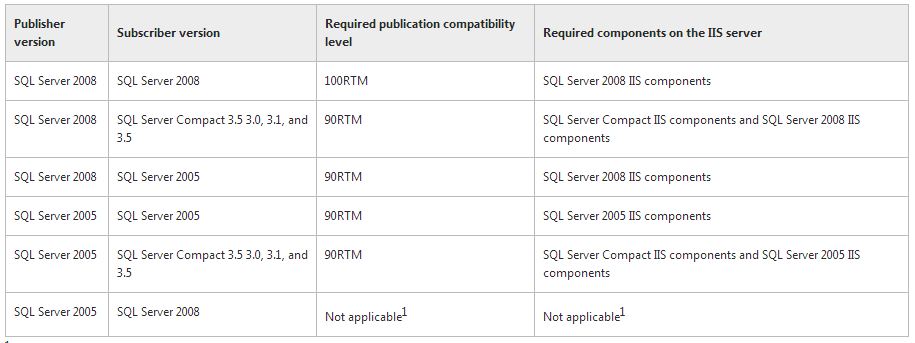
 

compatibility levels for web sychronizations


Replication Topologies

Replecation Features:


Error code 0x5. [SQLSTATE 42000] (Error 15404): Could not obtain information about Windows NT group/user


Error 0x5 means access denied.

Try to changing the owner of the jobs to the ‘sa’ account, on the properties of the job.

If the above does no help, please change the service account for the SQL Server agent service to account with proper permissions.

http://technet.microsoft.com/en-us/library/ms345578.aspx

I hope this will helps .

21 March 2013

Express edition features version wise

These are the features improved in express edition of sql server version wise


Backup the database using RETAINDAYS option


I have many times seen people specifying something like 3, and expect SQL Server to keep the three most recent backups in the backup file and overwrite everything which is older than that. Well, that is not what the option does.

But before we go into details, let's look at an example backup command which is using this option:

BACKUP DATABASE sqlmaint TO DISK = 'R:\sqlmaint.bak' WITH RETAINDAYS = 3

The RETAINDAYS is also exposed in the backup dialog in SSMS: "Backup set will expire: After x days".

It is also exposed in Maintenance Plans, the backup task. The option is named "Backup set will expire: After x days". It is only enabled if you select the "Back up databases across one or more files" option, which is not the default option. This makes sense.
The default option is "Create a backup files for every database", which means that every time a backup is performed, a new file is created consisting of the database name, date and time. Since we will see that this option is only relevant when we do append, it makes sense in the RETAINDAYS not being enabled for this choice.

So what does this option do? All it does is make SQL Server return an error message of you try to do a backup using the INIT option (which means overwrite) before the date and time has occurred. In other words, it tries to help you in not overwriting a backup file, using the INIT option, before it is time. You can still overwrite earlier by either using the stronger FORMAT option instead of INIT; or by simply deleting the backup file. Btw, the RETAINDAYS parameter has a cousin named EXPIREDATE, which does the same thing but you specify a datetime value instead of number of days.
Backup generations
So, we have seen that RETAINDAYS do not in any way provide any automatic backup generation handling. There is no such functionality built-in in the BACKUP command. This means that when you are looking for functionality such as "keep backup files three days, and remove older than that", you need to look outside the BACKUP command. I.e., some script or tool of some sort.