8 April 2013

Checkpoint


For performance reasons, the Database Engine performs modifications to database pages in memory—in the buffer cache—and does not write these pages to disk after every change. Rather, the Database Engine periodically issues a checkpoint on each database. A checkpoint writes the current in-memory modified pages (known as dirty pages) and transaction log information from memory to disk and, also, records information about the transaction log.
The Database Engine supports several types of checkpoints: automatic, indirect, manual, and internal. The following table summarizes the types of checkpoints


Automatic: EXEC sp_configure 'recovery interval','seconds'
Description: Issued automatically in the background to meet the upper time limit suggested by the recovery interval server configuration option. Automatic checkpoints run to completion. Automatic checkpoints are throttled based on the number of outstanding writes and whether the Database Engine detects an increase in write latency above 20 milliseconds.


Indirect: ALTER DATABASE … SET TARGET_RECOVERY_TIME =target_recovery_time{ SECONDS | MINUTES }
Description: Issued in the background to meet a user-specified target recovery time for a given database. The default target recovery time is 0, which causes automatic checkpoint heuristics to be used on the database. If you have used ALTER DATABASE to set TARGET_RECOVERY_TIME to >0, this value is used, rather than the recovery interval specified for the server instance.


Manual: CHECKPOINT [ checkpoint_duration ]
Description: Issued when you execute a Transact-SQL CHECKPOINT command. The manual checkpoint occurs in the current database for your connection. By default, manual checkpoints run to completion. Throttling works the same way as for automatic checkpoints. Optionally, the checkpoint_durationparameter specifies a requested amount of time, in seconds, for the checkpoint to complete.


Internal: None
Description: Issued by various server operations such as backup and database-snapshot creation to guarantee that disk images match the current state of the log.

2 April 2013

Sql server database states

 In sql server database having several states. The following are the database states.

ONLINE State :

          Database is available for access. The primary filegroup is online, although the undo phase of recovery may not have been completed.


OFFLINE State :

        Database is unavailable. A database becomes offline by explicit user action and remains offline until additional user action is taken. For example, the database may be taken offline in order to move a file to a new disk. The database is then brought back online after the move has been completed.

 
RESTORING State :

          One or more files of the primary filegroup are being restored, or one or more secondary files are being restored offline. The database is unavailable.

 
RECOVERING State :

          Database is being recovered. The recovering process is a transient state; the database will automatically become online if the recovery succeeds. If the recovery fails, the database will become suspect. The database is unavailable.

 
RECOVERY PENDING State :

            Database is being recovered. The recovering process is a transient state; the database will automatically become online if the recovery succeeds. If the recovery fails, the database will become suspect. The database is unavailable.

 
SUSPECT State :

           SQL Server has encountered a resource-related error during recovery. The database is not damaged, but files may be missing or system resource limitations may be preventing it from starting. The database is unavailable. Additional action by the user is required to resolve the error and let the recovery process be completed

 
EMERGENCY State :

        At least the primary filegroup is suspect and may be damaged. The database cannot be recovered during startup of SQL Server. The database is unavailable. Additional action by the user is required to resolve the problem.


I hope this article is useful to all users.

28 March 2013

Modified fix orphaned users script


I modified this script to handle the 'dbo' user. So yo no longer have to run sp_changedbowner 'sa' before (Or after) running this proc.

/*************************************************************************************
This procedure should be created in the Master database. This procedure takes no
parameters. It will remap orphaned users in the current database to EXISTING logins
of the same name. This is usefull in the case a new database is created by restoring
a backup to a new database, or by attaching the datafiles to a new server.
*************************************************************************************/

IF OBJECT_ID('dbo.sp_fixusers') IS NOT NULL
BEGIN
DROP PROCEDURE dbo.sp_fixusers
IF OBJECT_ID('dbo.sp_fixusers') IS NOT NULL
PRINT '<<< FAILED DROPPING PROCEDURE dbo.sp_fixusers >>>'
ELSE
PRINT '<<< DROPPED PROCEDURE dbo.sp_fixusers >>>'
END
GO
CREATE PROCEDURE dbo.sp_fixusers
AS
BEGIN
DECLARE @username varchar(25)
DECLARE fixusers CURSOR
FOR
SELECT UserName = name FROM sysusers
WHERE issqluser = 1 and (sid is not null and sid <> 0x0)
and suser_sname(sid) is null
ORDER BY name
OPEN fixusers
FETCH NEXT FROM fixusers
INTO @username
WHILE @@FETCH_STATUS = 0
BEGIN
IF @username='dbo'
BEGIN
EXEC sp_changedbowner 'sa'
END
ELSE
BEGIN
EXEC sp_change_users_login 'update_one', @username, @username
END
FETCH NEXT FROM fixusers
INTO @username
END

CLOSE fixusers
DEALLOCATE fixusers
END
go
IF OBJECT_ID('dbo.sp_fixusers') IS NOT NULL
PRINT '<<< CREATED PROCEDURE dbo.sp_fixusers >>>'
ELSE
PRINT '<<< FAILED CREATING PROCEDURE dbo.sp_fixusers >>>'
go

Fix Orphaned users using script


/*************************************************************************************
This procedure should be created in the Master database. This procedure takes no
parameters. It will remap orphaned users in the current database to EXISTING logins
of the same name. This is usefull in the case a new database is created by restoring
a backup to a new database, or by attaching the datafiles to a new server.
*************************************************************************************/


IF OBJECT_ID('dbo.sp_fixusers') IS NOT NULL
BEGIN
DROP PROCEDURE dbo.sp_fixusers
IF OBJECT_ID('dbo.sp_fixusers') IS NOT NULL
PRINT '<<< FAILED DROPPING PROCEDURE dbo.sp_fixusers >>>'
ELSE
PRINT '<<< DROPPED PROCEDURE dbo.sp_fixusers >>>'
END

GO
CREATE PROCEDURE dbo.sp_fixusers
AS
BEGIN
DECLARE @username varchar(25)
DECLARE fixusers CURSOR
FOR

SELECT UserName = name FROM sysusers
WHERE issqluser = 1 and (sid is not null and sid <> 0x0)
and suser_sname(sid) is null
ORDER BY name

OPEN fixusers
FETCH NEXT FROM fixusers
INTO @username

WHILE @@FETCH_STATUS = 0
BEGIN
EXEC sp_change_users_login 'update_one', @username, @username
FETCH NEXT FROM fixusers
INTO @username
END


CLOSE fixusers
DEALLOCATE fixusers
END
go
IF OBJECT_ID('dbo.sp_fixusers') IS NOT NULL
PRINT '<<< CREATED PROCEDURE dbo.sp_fixusers >>>'
ELSE
PRINT '<<< FAILED CREATING PROCEDURE dbo.sp_fixusers >>>'
go


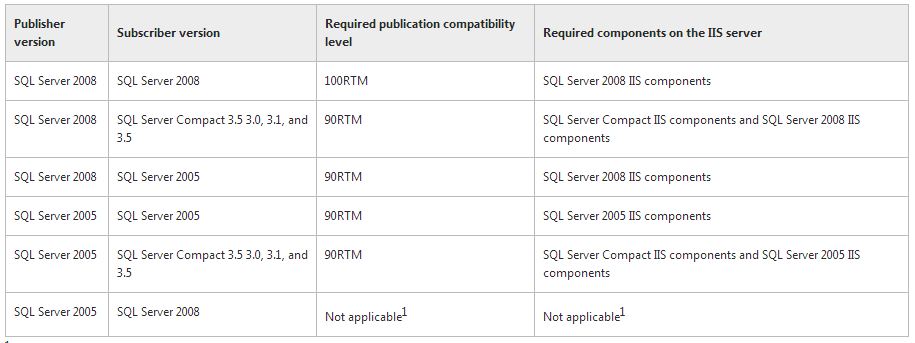
compatibility levels for web sychronizations


Replication Topologies

Replecation Features:


Error code 0x5. [SQLSTATE 42000] (Error 15404): Could not obtain information about Windows NT group/user


Error 0x5 means access denied.

Try to changing the owner of the jobs to the ‘sa’ account, on the properties of the job.

If the above does no help, please change the service account for the SQL Server agent service to account with proper permissions.

http://technet.microsoft.com/en-us/library/ms345578.aspx

I hope this will helps .